- Home
- Our Software
- Accounting Software
Accounting software in Saudi Arabia for SMEs — VAT and e-invoicing built in
Every sale, purchase and expense posts to a proper double-entry ledger. Your quarterly VAT return is one click, and your accountant can log in any time.
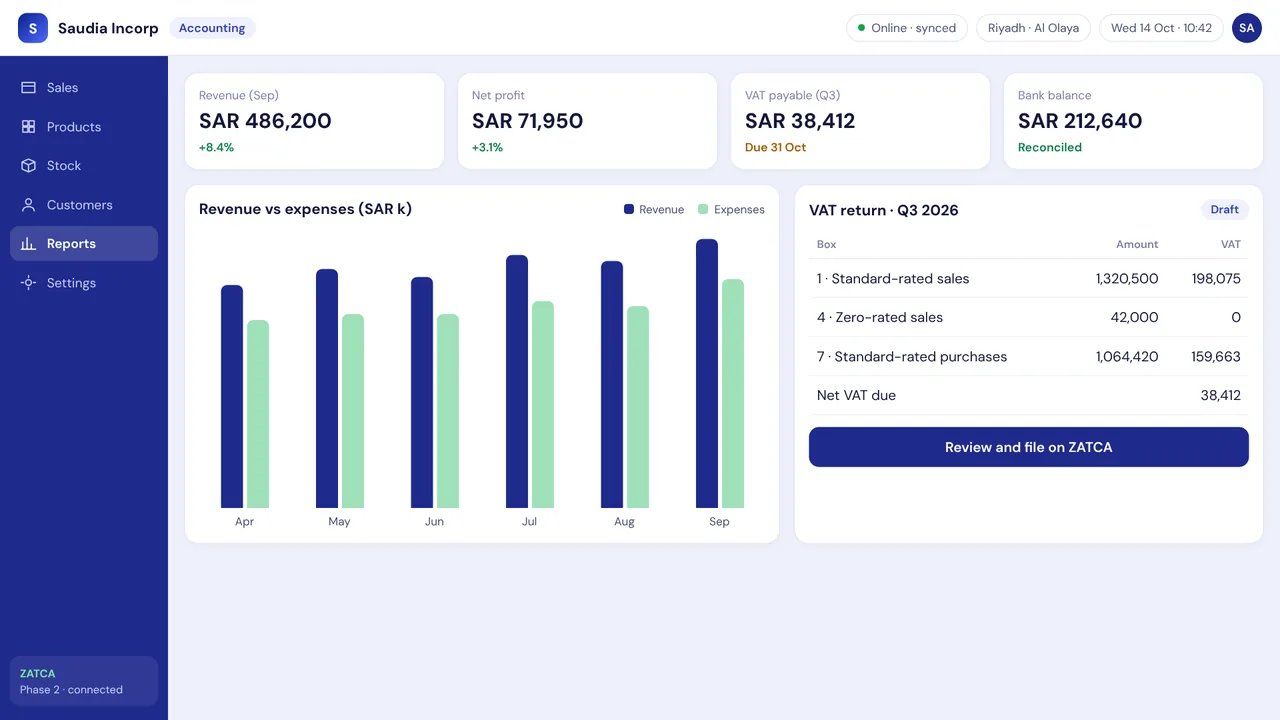
Saudia Incorp Accounting is cloud accounting software for small and medium businesses in Saudi Arabia. Sales from the POS, purchases and expenses post automatically to a double-entry ledger; the quarterly VAT return is generated from those entries; invoices follow ZATCA e-invoicing requirements; and financial statements are available in Arabic and English for you and your accountant.
Trusted by retailers across the Kingdom
ZATCA Phase 2 ready 15% VAT built in Arabic + English mada · Apple Pay · STC Pay Cloud + offline modeAccounting Software
Double-entry ledger, VAT returns ready for ZATCA, bank reconciliation, and bilingual financial statements.
VAT return in one click
Box-by-box return matching the ZATCA portal format.
Bank reconciliation
Import statements from Al Rajhi, SNB, Riyad Bank and others.
Financial statements
P&L, balance sheet and cash flow in Arabic and English.
Multi-company
Several CRs under one login with consolidated reporting.
Expense & petty cash
Snap a receipt, approve, post.
Accountant access
Role-based access with full audit trail.
Daily operating procedure
- 1
Connect your sales
POS sales, purchases and supplier bills post automatically to the double-entry ledger; no daily re-entry.
- 2
Record expenses
Staff snap a photo of each receipt; a manager approves it and the expense posts to the right account.
- 3
Reconcile the bank
Import the statement from Al Rajhi, SNB, Riyad Bank or another bank and match it to the ledger.
- 4
Review the month
Run the P&L, balance sheet and cash flow in Arabic or English, per company or consolidated across several CRs.
- 5
File the VAT return
Generate the box-by-box VAT return from the posted entries, check it, and file it on the ZATCA portal.
- 6
Give your accountant access
Invite your external accountant with a role that limits what they can change; every edit is in the audit trail.
Compliance you don't have to think about. Speed you'll notice on day one.
- ZATCA Phase 2, automatically — Device onboarding, cryptographic signing, QR codes, and real-time clearance or 24-hour reporting — handled for you.
- Bilingual everywhere — Arabic and English for staff screens, receipts, reports and customer messages.
- Local support that answers — WhatsApp and phone support from Riyadh, in Arabic and English, 24/7 for critical issues.
- Your data stays yours — Hosted in-Kingdom, exportable any time, with daily backups and role-based access.
فاتورة ضريبية مبسطة · Simplified Tax Invoice
From first call to first invoice in three steps
Book a demo
A 20-minute call to understand your shop, branches and hardware. We show you the edition that fits.
We set it up
We import your products and customers, onboard your device with ZATCA, and train your staff in Arabic or English.
Go live with support
Start selling. Our team stays on WhatsApp through your first week and beyond.
Frequently asked questions
Straight answers about compliance, pricing and migration.
Which accounting software is best for a business in Saudi Arabia?+
Is it easy to use if I'm not an accountant?+
Is it suitable for my external accountant?+
Does it replace my POS?+
Is Saudia Incorp compliant with ZATCA Phase 2 (the integration phase)?+
How is 15% VAT handled?+
You may also need
Supermarket & Grocery POS
Fast checkout for thousands of SKUs, weighing-scale barcodes, expiry tracking and shelf-label printing.
Learn moreFashion & Boutique POS
Size/colour matrices, seasonal collections, exchanges and loyalty for clothing, abaya and shoe stores.
Learn moreRestaurant & Café POS
Table, takeaway and delivery orders, kitchen display, modifiers, and integrations with HungerStation and Jahez.
Learn moreE-commerce Marketplace Platform
Launch a multi-vendor marketplace in Arabic and English: seller onboarding, commissions, payouts, mada and Apple Pay checkout, and local shipping.
Learn moreStill confused about our services? Consult with our experts
Book a 20-minute demo. We'll set up a sandbox with your own products so you can test real invoices before you decide.