- Home
- Our Software
- POS Software
POS system in Saudi Arabia — cashier, stock and ZATCA e-invoicing in one
The point-of-sale at the heart of every Saudia Incorp edition. Bill in seconds, accept every Saudi payment method, and stay compliant automatically.
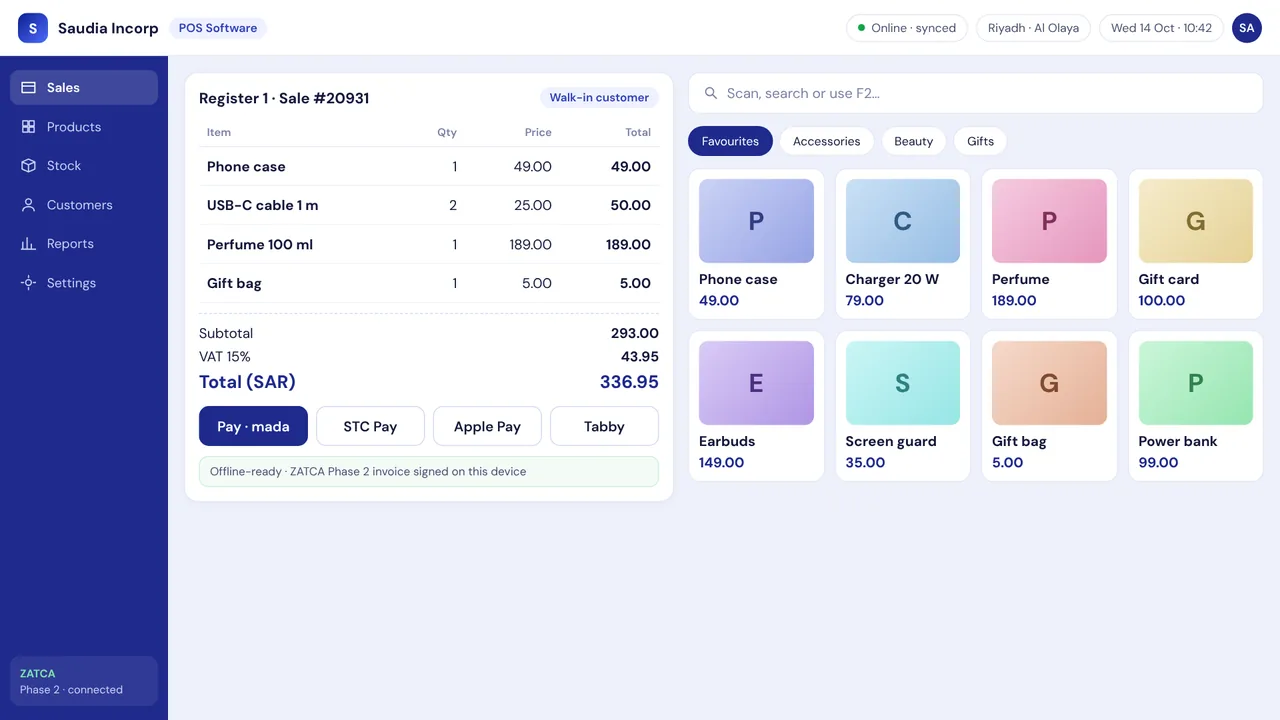
Saudia Incorp POS is a cloud point-of-sale (cashier) system for shops in Saudi Arabia. Staff bill by barcode, search or touch screen; customers pay by cash, mada, Apple Pay or STC Pay; every sale updates stock across branches and produces a ZATCA Phase 2 e-invoice with a QR code. It runs on Windows, Android and iPad and keeps selling offline.
Trusted by retailers across the Kingdom
ZATCA Phase 2 ready 15% VAT built in Arabic + English mada · Apple Pay · STC Pay Cloud + offline modePOS Software
The core point-of-sale: lightning-fast billing, mada/Apple Pay, ZATCA QR receipts, offline mode, any device.
Sub-5-second checkout
Barcode, search or touch grid; keyboard shortcuts for power users.
Every payment method
Cash, mada, Visa/Mastercard, Apple Pay, STC Pay, Tabby, Tamara and split payments.
ZATCA Phase 2
Cryptographically signed invoices with QR, reported to Fatoora automatically.
Offline mode
Keep selling if the internet drops; sync later.
Runs on anything
Windows, Android tablets, iPad and Sunmi/iMin terminals.
Shift & cash control
Open/close shifts, cash counts and discrepancy reports.
Daily operating procedure
- 1
Open the shift
The cashier signs in and enters the opening cash. The register works on Windows, Android tablets, iPad or Sunmi/iMin terminals.
- 2
Bill the sale
Add items by barcode, search or the touch grid. Keyboard shortcuts keep checkout under five seconds.
- 3
Take any payment
Accept cash, mada, Visa/Mastercard, Apple Pay, STC Pay, Tabby, Tamara or a split payment.
- 4
Issue the e-invoice
Each sale produces a signed ZATCA Phase 2 invoice with a QR code, reported to Fatoora automatically.
- 5
Keep selling offline
If the internet drops, the register keeps selling and syncs sales and invoices when it reconnects.
- 6
Close and reconcile
Count the drawer at shift end; the system shows any discrepancy and stock is already updated across branches.
Compliance you don't have to think about. Speed you'll notice on day one.
- ZATCA Phase 2, automatically — Device onboarding, cryptographic signing, QR codes, and real-time clearance or 24-hour reporting — handled for you.
- Bilingual everywhere — Arabic and English for staff screens, receipts, reports and customer messages.
- Local support that answers — WhatsApp and phone support from Riyadh, in Arabic and English, 24/7 for critical issues.
- Your data stays yours — Hosted in-Kingdom, exportable any time, with daily backups and role-based access.
فاتورة ضريبية مبسطة · Simplified Tax Invoice
From first call to first invoice in three steps
Book a demo
A 20-minute call to understand your shop, branches and hardware. We show you the edition that fits.
We set it up
We import your products and customers, onboard your device with ZATCA, and train your staff in Arabic or English.
Go live with support
Start selling. Our team stays on WhatsApp through your first week and beyond.
Frequently asked questions
Straight answers about compliance, pricing and migration.
What is the difference between a POS system and cashier software?+
Is there a free version?+
Which hardware do I need?+
Is it ZATCA Phase 2 (integration) compliant?+
Is Saudia Incorp compliant with ZATCA Phase 2 (the integration phase)?+
How is 15% VAT handled?+
You may also need
Supermarket & Grocery POS
Fast checkout for thousands of SKUs, weighing-scale barcodes, expiry tracking and shelf-label printing.
Learn moreFashion & Boutique POS
Size/colour matrices, seasonal collections, exchanges and loyalty for clothing, abaya and shoe stores.
Learn moreRestaurant & Café POS
Table, takeaway and delivery orders, kitchen display, modifiers, and integrations with HungerStation and Jahez.
Learn moreE-commerce Marketplace Platform
Launch a multi-vendor marketplace in Arabic and English: seller onboarding, commissions, payouts, mada and Apple Pay checkout, and local shipping.
Learn moreStill confused about our services? Consult with our experts
Book a 20-minute demo. We'll set up a sandbox with your own products so you can test real invoices before you decide.